As a reminder – that’s how the EditProductPage looks:
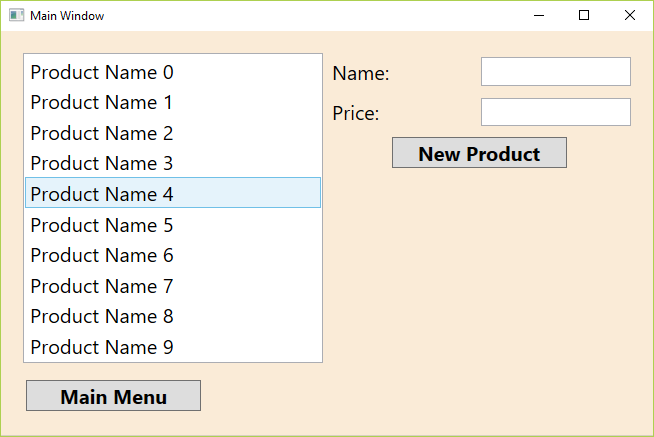
First of all we need a view model class. Create a class named EditProductPageVM, and derive it from the class PageVM. Add a constructor with parameters of type ISystemConnector and PageFrameVM and and pass the parameters to the base class constructor:
namespace SimpleMVVM.ViewModels
{
    public class EditProductPageVM : PageVM
    {
        public EditProductPageVM(ISystemConnector systemConnector, PageFrameVM pageFrame)
            : base(systemConnector, pageFrame)
        {
        }
    }
}
Create a new RelayCommand named ShowEditProductPageCommand in MainMenuPageVM:
using System.Windows;

namespace SimpleMVVM.ViewModels
{
    public class MainMenuPageVM : PageVM
    {
        private RelayCommand _showEditProductPageCommand;

        public MainMenuPageVM(ISystemConnector systemConnector, PageFrameVM pageFrame)
            : base(systemConnector, pageFrame)
        {
            _quitCommand = new RelayCommand(ExecuteQuit, QuitCanExecute);
            _showEditCustomerPageCommand = new RelayCommand(ExecuteShowEditCustomerPageCommand, ShowEditCustomerPageCommandCanExecute);
            _showEditProductPageCommand = new RelayCommand(ExecuteShowEditProductPageCommand, ShowEditProductPageCommandCanExecute);
            MainMenuButtonVisibility = Visibility.Collapsed;
        }

        public RelayCommand ShowEditProductPageCommand
        {
            get
            {
                return _showEditProductPageCommand;
            }
            set
            {
                _showEditProductPageCommand = value;
            }
        }

        private void ExecuteShowEditProductPageCommand(object o)
        {
            PageFrame.CurrentPage = new EditProductPageVM(SystemConnector, PageFrame);
        }

        private bool ShowEditProductPageCommandCanExecute(object o)
        {
            return true;
        }
    }
}
Create a new EditProductPageVM object in ExecuteShowEditProductPageCommand() and assign it to the CurrentPage property of the page frame object:
using System.Windows;

namespace SimpleMVVM.ViewModels
{
    public class MainMenuPageVM : PageVM
    {
        // ...

        private void ExecuteShowEditProductPageCommand(object o)
        {
            PageFrame.CurrentPage = new EditProductPageVM(SystemConnector, PageFrame);
        }
    }
}
Bind to the new command in MainMenuPage.xaml:
<UserControl x:Class="SimpleMVVM.MainMenuPage"
             xmlns="http://schemas.microsoft.com/winfx/2006/xaml/presentation"
             xmlns:x="http://schemas.microsoft.com/winfx/2006/xaml"
             xmlns:mc="http://schemas.openxmlformats.org/markup-compatibility/2006"
             xmlns:d="http://schemas.microsoft.com/expression/blend/2008"
             xmlns:local="clr-namespace:SimpleMVVM"
             mc:Ignorable="d"
             d:DesignHeight="300" d:DesignWidth="300">

    <StackPanel Orientation="Vertical">
        <Button Content="Edit Customers" Command="{Binding ShowEditCustomerPageCommand}"  Style="{StaticResource MainMenuButton}" />
        <Button Content="Edit Products" Command="{Binding ShowEditProductPageCommand}"  Style="{StaticResource MainMenuButton}" />
        <Button Content="Calculate Invoice" Style="{StaticResource MainMenuButton}" />
        <Button Content="Quit" Command="{Binding QuitCommand}" Style="{StaticResource MainMenuButton}" />
    </StackPanel>
</UserControl>
We finally need a data template for the page itself in App.xaml:
<DataTemplate DataType="{x:Type VM:EditProductPageVM}">
    <View:EditProductPage />
</DataTemplate>
If you run the application, the page should display now.